
This page details the specific configuration and input options for the Purge From Trash Orchestrator.
This guidance should be read in conjunction with the Common Configuration page which details the standard application configuration.
Purpose
The key purpose for this Orchestrator is to delete documents present in the iManage trash. Generally deleted documents are preserved in the trash until actioned on based on pre-defined conditions.
Operation Name
PurgeFromTrash
Common Configuration
There is common configuration available within this job Orchestrator. The common configuration options can be found here.
Functionality
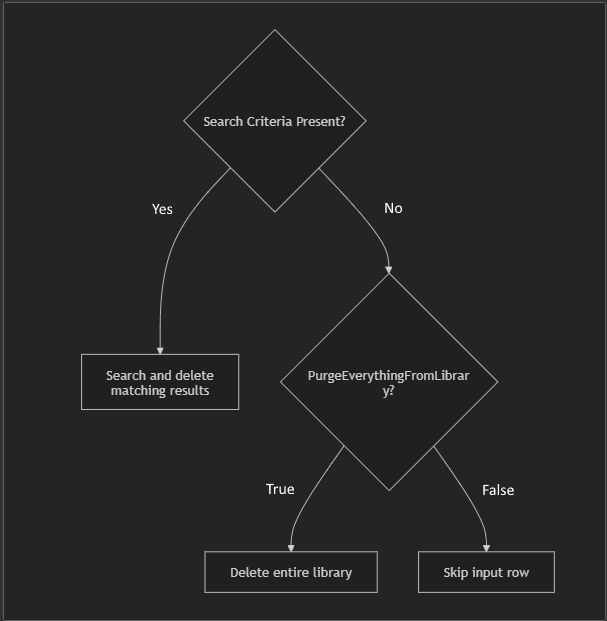
Below is a diagram that shows the functionality of orchestrator. Note that SearchCriteria overwrites the job file flag PurgeEverythingFromLibrary
Input Data Schema
Data can be read via SQL or CSV and requires the following data headers and values:
CSV
|
Headers |
Description |
Mandatory |
Expected Value |
|---|---|---|---|
|
|
This is the row ID |
Yes |
Numeric value |
|
|
The ID of the iManage Library which Purge will be executed against |
Yes |
iManage Library identifier i.e. ‘Active’ |
|
|
Search criteria in a valid JSON format |
No |
{ “DocumentNumber”:”1234”, “Version”:”>2”
|
|
|
Indicates if the row has been processed |
Yes |
'0' |
SQL Input table
SQL Input uses the same values as the CSV input above. The SQL Schema is detailed below:
CREATE TABLE PurgeFromTrashInput (
    Id INT IDENTITY(1,1) PRIMARY KEY,
    Processed BIT NOT NULL,
    Library VARCHAR(50) NULL,
    SearchCriteria NVARCHAR(MAX) NULL
);
SQL Output table
CREATE TABLE PurgeFromTrashOutput(
	Id INT IDENTITY(1,1) PRIMARY KEY,
	CorrelationId VARCHAR(36) NOT NULL,
	EventTime DATETIMEOFFSET NOT NULL,
	Status VARCHAR(MAX) NULL,
	Message VARCHAR(MAX) NULL,
	DataSourceRowId VARCHAR(25),
	Library VARCHAR(50) NULL,
	SearchCriteria VARCHAR(MAX) NULL,
	SearchResultCount INT NULL,
	SearchResultList VARCHAR(MAX) NULL
)
Job File Options
This section details the configurable options within the orchestrator.
|
Configuration |
Description |
Expected Value |
|---|---|---|
|
|
Whether the operation should be run or not |
|
|
|
Whether the operation should clear the entire library, or only specified search criteria. Note: When this option is |
|
Sample Job File
This is an example Job File for the Purge From Trash Orchestrator:
{
  "Operation": "PurgeFromTrash",
  "Options": {
    "Enabled": true,
    "PurgeEverythingFromLibrary" : false
  },
  "InputType": "SQL",
  "Inputs": {
    "CSV": {
      "Path": ""
    },
    "SQL": {
      "ConnectionString": "",
      "Table": "PurgeFromTrashInput",
      "Schema": "dbo"
    }
  },
  "Outputs": {
    "Console": {
      "Enabled": true,
      "SubscribedTo": ["*"]
    },
    "CSV": {
      "Handlers": [
        {
          "Enabled": true,
          "Path": "",
          "FileNameTemplate": "Administrate_Report_<DATETIME>",
          "SubscribedTo": [ "*" ]
        }
      ]
    },
    "SQL": {
      "Handlers": [
        {
          "Enabled": true,
          "ConnectionString": "",
          "Table": "PurgeFromTrashOutput",
          "Schema": "dbo",
          "SubscribedTo": [ "*" ]
        }
      ]
    }
  },
  "Integrations": {
    "IManage": {
      "URL": "",
      "Username": "",
      "Password": ""
    }
  }
}
Examples for search criteria
Guidelines for populating the search criteria. The values must be provided in quotes. Keys are compared against the expected properties for the search criteria and validated upon start up of the operation. Invalid input rows will be displayed to the user in the CLI.
|
Value |
DataType |
Example |
Notes |
|---|---|---|---|
|
DocumentNumber |
Text |
1234 100-250 >150 1, 2, 3, 4 |
Can specify single id; range;
|
|
Version |
Text |
Same as above |
Same as above |
|
DeletedDate
|
Text |
-30:0d (last 30 days) 0:0d (today) -1:-1d (yesterday) 6:0d (last 7 days)
|
This is range format, refer to https://help.imanage.com/hc/en-us/articles/4412558535067-iManage-Work-Universal-API-Documentation-for-cloudimanage-com#overview--date-range-format |
|
CreateDateFrom
|
DateTime |
07/16/2026 00:00:00 +01:00 |
|
|
LastUser
|
Text |
AdamP |
|
|
Class
|
Text |
A test class & a test subclass |
|
|
Client Matter |
Text |
Custom1 =TigerEye
|
|
|
Type |
Text |
DOCX; JSON; PDF; |
|
|
DeclaredAsRecord
|
Boolean |
true/false |
|